Basketball Dunk AI
EN
Make my video

Your video is one step away

Sign-in is free and needs no card. We never publish your photo.

By continuing you agree to the terms and privacy policy.

Basketball Dunk AI

Basketball Dunk AI Video

Every shot, the file specs, and which format to post where.

Updated Oct 27, 2026 · Independent tool. Not affiliated with, endorsed by or sponsored by the NBA, any basketball league or team, TikTok or CapCut.

Generator

Make your basketball dunk ai video

Three choices and one tap. The shot list, the timing and the prompt are already built.

01 Add your photo

Face clearly visible, ideally head to knees. JPG, PNG or WebP, up to 10 MB.

02 Pick the template

03 Model, quality and format

Standard · 720p · 9:16Change model, resolution or format 10 credits

Model

Resolution

Format

By generating, you confirm the photo shows you or people who gave permission, all 18 or older, and no celebrities or public figures. Terms · Privacy

Get credits to make your video

✓ No subscription needed: pay once, pack credits never expire.

/mo

once

Pay once, no subscription. Credits never expire.

once

Secure checkout by Waffo · Packs are one-time and never expire · Plans renew until cancelled, cancel anytime from your account

What do you get in a basketball dunk ai video?

A basketball dunk AI video from Basketball Dunk AI is a 6-second MP4 in which the person from your photo drives, dunks over a defender and celebrates, with the trend sound mixed in, no watermark, and your choice of 9:16, 1:1 or 16:9. The generator above is preset to Open Gym Slam.

What happens in the video, beat by beat?

The video follows the same six beats every time, in 6 seconds. The template you pick changes the setting and who is in it, not the order of the shots.

TimeShotWhat you see
0.0–1.0sThe driveA low, wide shot: you take two hard dribbles down the lane toward one defender.
1.0–1.6sTake-offYou gather the ball and leap; the defender jumps with both arms up a beat too late.
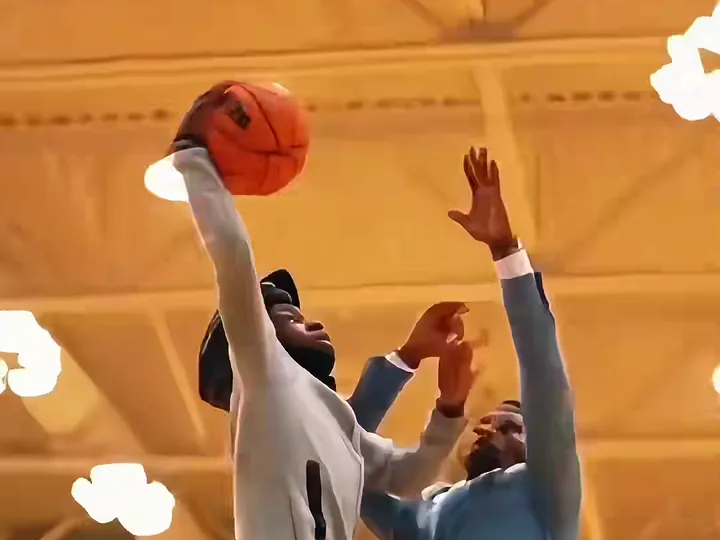
1.6–2.8sThe slamThe camera looks up from under the basket: you throw it down over the defender and hang on the rim.
2.8–4.2sThe replayCut to a second angle from the baseline: the same drive and leap, seen from the side.
4.2–5.0sThrough the netClose-up of the rim as the ball drops through the net.
5.0–6.0sThe landingYou land, turn toward the camera and celebrate while the defender stays down.

What are the specs?

SpecValue
Length6 seconds, every tier
Formats9:16, 1:1 or 16:9
Resolution480p and 720p on every model, 1080p on Pro and Ultra
FileMP4 (basketball-dunk-ai.mp4)
SoundThe trend sound, already mixed in
WatermarkNone
Standard render timeAbout four minutes
Download window24 hours after rendering

Which format should you post?

  • TikTok, Reels and Shorts: 9:16. It fills the phone screen.
  • An Instagram feed post: 1:1.
  • YouTube, a laptop or a TV: 16:9.
  • A group chat: 9:16 at 480p keeps the cost lowest and looks fine on a phone.

The sound is already on the file, and the apps let you swap the audio when you post. Which look suits which template is on the templates page, and model tiers and credits are on the pricing page.

What can go wrong?

The ball or hands can smear for a frame during the leap, the invented defender occasionally resembles the dunker (render again), and faces drift with small, dark or side-on photos, where Pro and Ultra hold faces better. Photos must show you or an adult who agreed. For the trend itself see the trend page, and for choosing a tool see the generator checklist. Independent tool. Not affiliated with, endorsed by or sponsored by the NBA, any basketball league or team, TikTok or CapCut. Make yours above.

Related: how to make the video, why there is no official filter and how to choose a generator.
Examples

AI dunks from the trend

Remakes of the trend posted on TikTok, played with the trend sound. Tap the speaker for sound.

Three steps

How to do the basketball dunk ai trend

No timeline editing and no prompt writing. The clip is already choreographed, you bring the face.

01

Upload one photo

A clear, front-facing photo that shows your face, hair and the outfit you want to wear in the video.

02

Pick the template

Choose one of 3 templates: Poster Dunk, Dunk on Your Friend (add their photo too) or Open Gym Slam.

03

Download and post

Get the 6-second MP4 with the trend sound already on it and post it to TikTok, Reels or Shorts.

Questions

FAQ

Does the basketball dunk ai video have a watermark?

No. A basketball dunk ai video from Basketball Dunk AI downloads as a plain MP4 with no watermark, 6 seconds long, with the trend sound already mixed in. Download it within 24 hours of the render, because finished files are deleted after that. A failed or blocked render returns its credits automatically.

Which resolution should I pick for a basketball dunk ai video?

For TikTok, Reels and Shorts, 720p is enough: a basketball dunk ai video at Standard 720p costs 10 credits on Basketball Dunk AI and is the default. Pick 1080p only for a big screen; it is offered on Pro and Ultra only. 480p is the cheapest and fine for a group chat.

Can I make a square basketball dunk ai video for Instagram?

Yes. Basketball Dunk AI offers a 1:1 square basketball dunk ai video for feed posts, next to 9:16 for Reels and TikTok and 16:9 for YouTube or a screen. You choose the ratio before you generate, and the length stays 6 seconds.

Your video is one photo away

Upload a photo, pick the template, throw it down.

Make my video
Poster Dunk